Voice Notes: Talk Through the Job, RouteHouse Drafts the Report
Voice Notes Included on Pro · add-on on Growth

Talk through the job. RouteHouse fills in the report.

At the end of a job the tech taps the mic and talks naturally. RouteHouse drafts the entries on the service report and the charges from your own price list. The tech checks the draft, unticks anything wrong and taps Apply — nothing goes on the report until they do.

Start on Pro Book a 20-min demo

Included on Pro · available as an add-on on Growth · See pricing
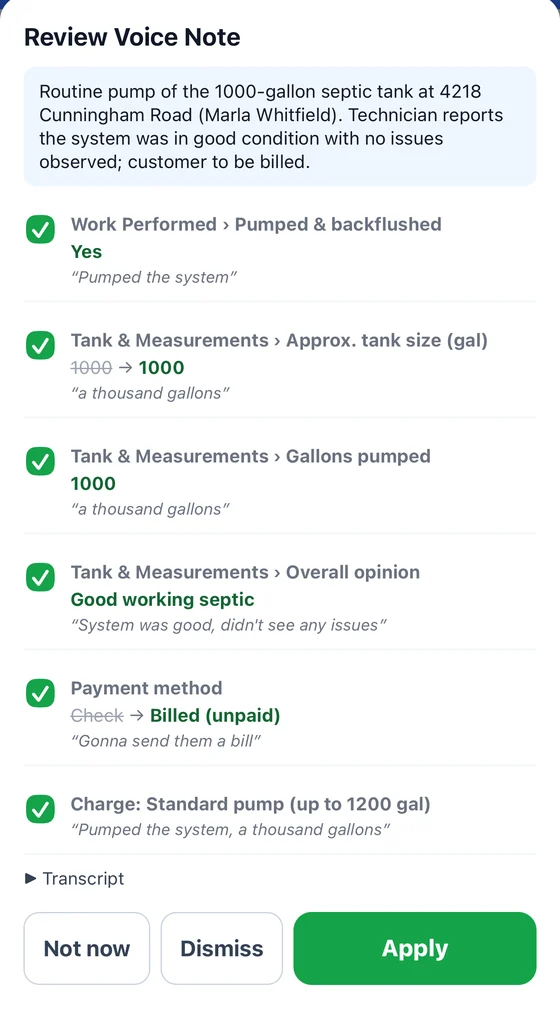
RouteHouse Review Voice Note screen: a summary of the pump-out, then ticked entries for work performed, tank size, gallons pumped, overall opinion, payment method changed from Check to Billed, and a Standard pump charge, each with the words it came from, above Not now, Dismiss and Apply buttons

Every line shows the words it came from
How it works · real screens

Drafts the report for the tech to check

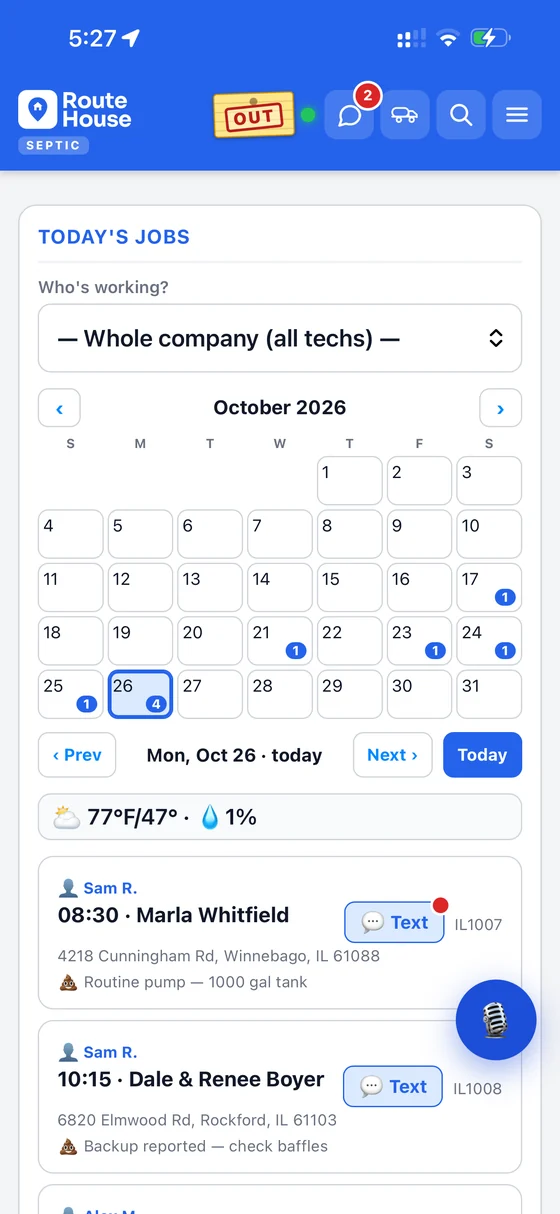
RouteHouse septic Today's Jobs screen with the month calendar, the day's jobs and a microphone button floating over the job list

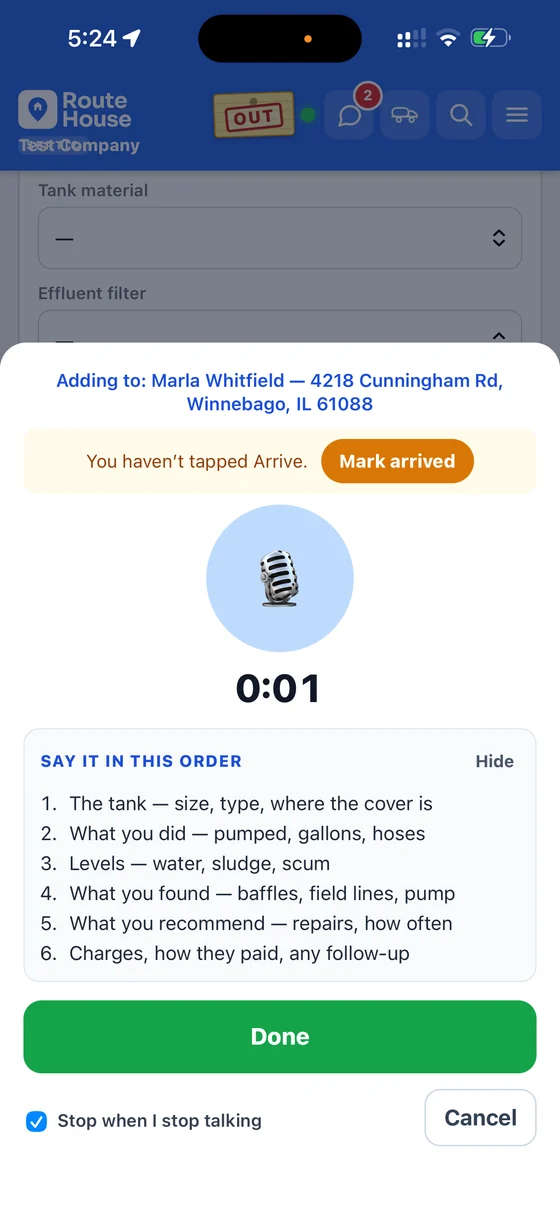
1 · Tap the mic

The mic button sits right on the day’s jobs. Or tap Add Voice Note on the job, say “Hey Siri, RouteHouse note,” or long-press the app icon on Android.

RouteHouse voice note recording screen adding to Marla Whitfield at 4218 Cunningham Rd, with a timer, a Say it in this order list of six septic prompts, a Done button and a Stop when I stop talking checkbox

2 · Talk it through

It shows which job the note is going to and what to cover, in order, for the trade. Recording stops on its own when the tech stops talking.

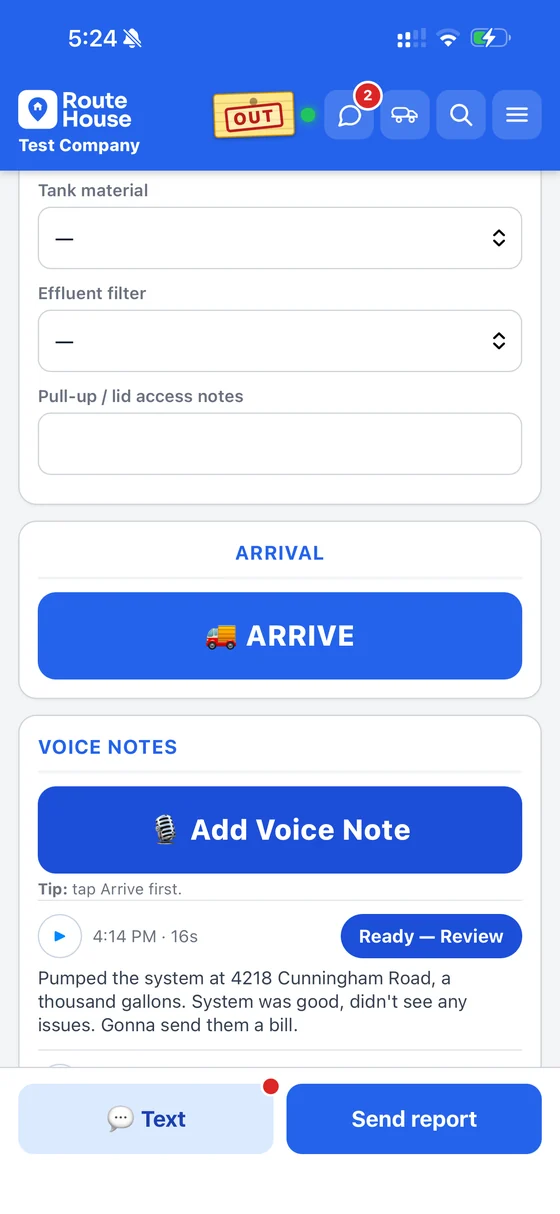
RouteHouse job screen with a Voice Notes section: an Add Voice Note button and a 16-second note marked Ready, Review, with its transcript below

3 · Saved on the job

The note and its transcript stay on the job. No signal? It saves on the phone and is written up once back in range.

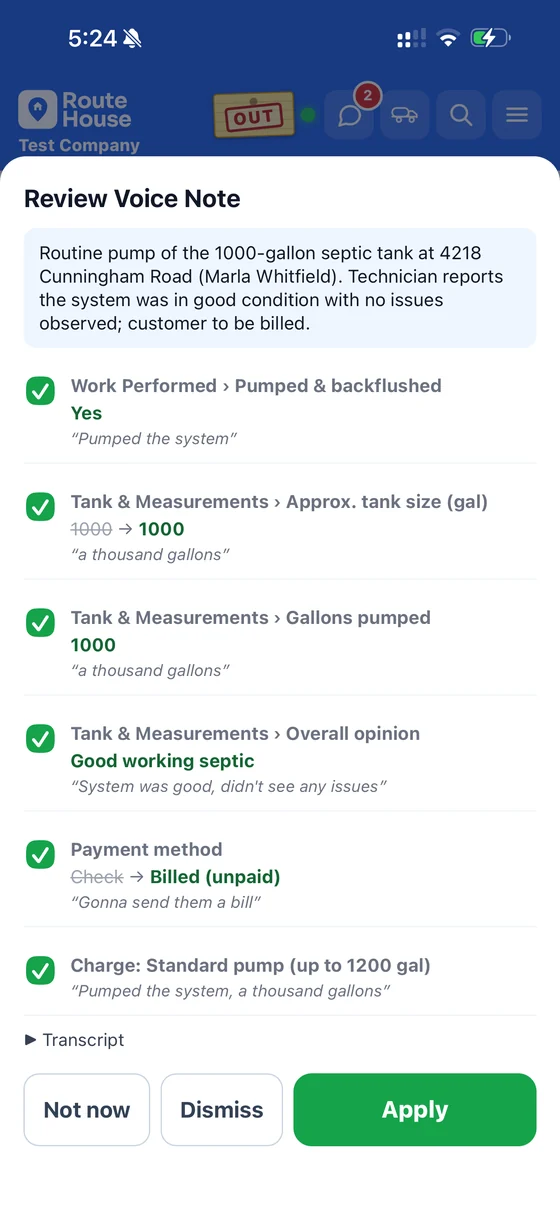
RouteHouse Review Voice Note screen listing ticked report entries and a charge from the price list, each with the words it came from, above Not now, Dismiss and Apply

4 · Check, then Apply

Each entry shows the words it came from, and the charge comes from your price list. Untick anything wrong — nothing goes on the report until the tech taps Apply.

Why it matters

Complete reports, without the typing

No typing in gloves

In the truck, on a ladder or over an open lid, the tech just talks. No small keyboard, no clean hands needed.

Reports come back complete

Instead of “ok,” you get the readings, the condition and what was paid — the details the customer and the next visit need.

Recommendations get billed

“Recommend a riser” lands on the report instead of being forgotten on the drive home, so the upsell gets followed up and billed.

Charges from your price list

Charges match the items and prices you already set up in RouteHouse — not made-up line items.

Starting a note

However the tech is holding the phone

Any phoneTap Add Voice Note on the job screen.
iPhone“Hey Siri, RouteHouse note.”
AndroidLong-press the RouteHouse app icon.
Hands-free stopRecording ends on its own when they stop talking.
The details

Built for how the day actually goes

Finds the right job

The job that’s open, the one they’ve started, or the one they’re parked at. Anything it can’t place goes to an Unfiled list to attach in one tap.

Works with no signal

The note saves on the phone and is written up once the tech is back in range.

Prompts for your trade

The screen shows what to say, in order, tailored to the trade — so nothing the report needs gets skipped.

Owner control

Turn Voice Notes on for the company, then off for any individual tech.

Included on Pro · add-on on Growth

Works across RouteHouse trades, with septic first. On Growth, ask us about adding it.

See plans & pricing
Questions

Voice Notes FAQ

Does anything go on the report without the tech?

No. RouteHouse drafts the entries and the tech checks them. Nothing goes on the report until they tap Apply.

What if it hears something wrong?

The tech unticks that line before applying, or fixes it on the report like any other entry. Always check the draft.

Where do the charges come from?

From your company’s own price list in RouteHouse. It matches what the tech said to items you already sell, so it doesn’t invent line items.

Does it work with no signal?

Yes. The note saves on the phone and is written up once the tech is back in range.

Can I turn it off for one tech?

Yes. The owner turns Voice Notes on for the company, then off for any individual tech.

Which plans and trades include Voice Notes?

It’s included on Pro and available as an add-on on Growth. It works across RouteHouse trades, with septic first.

Hear a voice note become a report

Book a 20-minute demo — we’ll load your price list and talk a real job through it.

Book a demo