Septic Pumping & Reporting Software — RouteHouse
Our flagship edition · Available now

Your paper pumping report, done in the truck.

RouteHouse was built with a working septic operator, on real routes, from the exact paper form your crew already fills out. Gallons, checklist, photos — captured on a tablet and emailed before the truck pulls away.

Works offline at the tank · Installs on any tablet · Priced by the truck, unlimited users

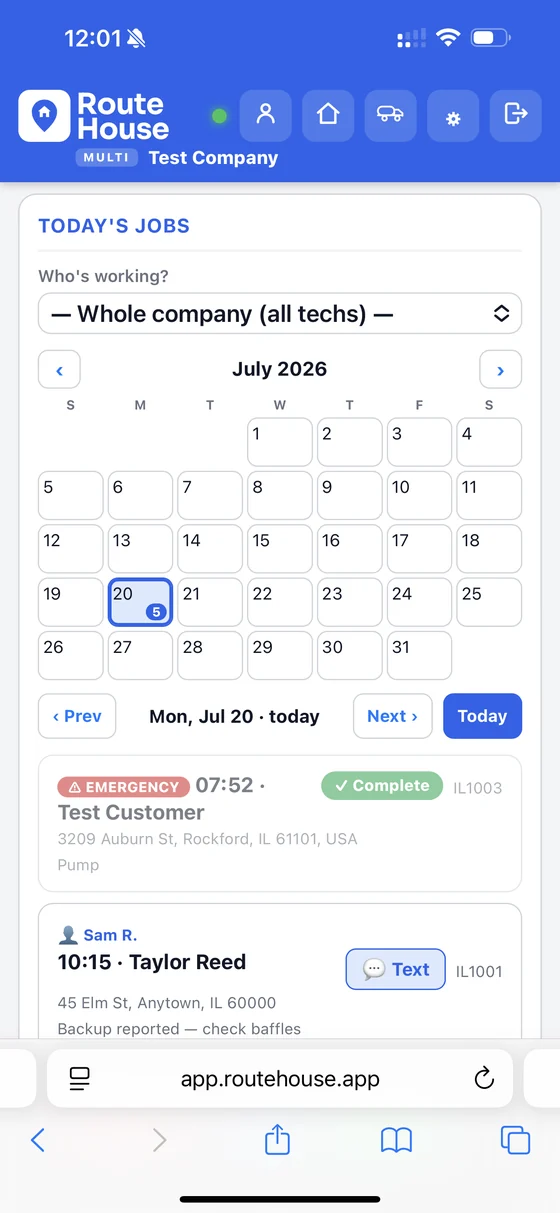
RouteHouse today's jobs screen on a phone — schedule calendar, the day's stops with customer, address and status, and an emergency job flagged
Every field from your paper form
Report emailed before you leave
Find the lid on the next visit
GPS tank & lid mapping built in

“We are very happy. RouteHouse has been great to work with!”

— 815 Septic Guy Verified customer

From clipboard to tablet

Everything your paper form does. And everything it can't.

Most field software makes you bend your job to fit their boxes. RouteHouse starts from your actual pumping report and mirrors it field-for-field, so the tech fills in what he always has — nothing new to learn at the tank.

The difference is what happens next. Gallons, tank condition and disposal aren't ink on a page, they're data. The report emails itself before he's off the property, the numbers feed the manifest, and next year the app already knows this tank is due.

  • Load test & tank details. Start time, tank size, condition, baffles and filter — the exact sections you inspect.
  • Gallons & full checklist. Prefilled from the price list and the property's last visit, so there's less to type at the tank.
  • Customer signature. The customer signs on the tablet, and the signature prints on the report — no separate paperwork.
  • Photos of the tank. Baffle damage, root intrusion, high solids — captured and attached to the record.
Load test start9:14 AM
Tank size1,000 gal
Compartments2
BafflesIntact
Effluent filterCleaned
Photos3 attached
Lid locationPin dropped
Built for pumpers

The things generic field apps get wrong for septic

Tank & lid GPS mapping

Drop a pin on the tank, lids, pump chamber and drain field when you're on site. Next visit, the tech walks straight to the lid instead of probing the yard — a real time-saver no generic tool offers well.

Regulatory manifests & trip tickets

Disposal manifests and trip tickets are often legally required. RouteHouse generates them tied to each job and disposal site — gallons, disposal site, weight ticket, hauler permit and signature, with the chain of custody kept for you. Empty the truck, get the plant’s signature on screen, and print the hauling log or manifest your state uses: generator, driver and plant operator sign on screen, and the manifest lists the stops that truck pumped today. Where the state and disposal site call for one (Wisconsin septage, for example) the manifest fields open on their own.

Property registry by state

Every address auto-numbered (IL1000, WI1000…) with tank size, history and owner. Search past jobs by address, and never re-measure a tank you pumped two years ago.

Service-due reminders

The registry already tracks who's due — the foundation for "your tank is due" reminders and postcards to the last payer by address, turning your own history into repeat revenue.

Address in the subject line

Reports email out with the service address right in the subject and the office CC'd — so the person back home can file it in one glance, no chasing the field.

Septic service work Growth & Pro

Not every job is a pump-out. Repairs, service calls and new installs get their own time & materials report — labor hours, parts off your price list, and equipment time priced as you go, so the invoice reflects the whole job instead of a flat pumping rate.

Predictive pumping (coming)

Tank size, gallons pumped and history combine to suggest each property's next service interval — and AI photo checks flag baffle damage and high solids from the pictures you already take.

A pumping job, start to finish

What a stop looks like on the app

1

Tap the job

The tech picks his name, sees the day's stops, taps the next one and gets one-tap directions in Apple or Google Maps — with tank size and last-service history already loaded.

2

Arrive & pump

One tap logs GPS, time and weather and starts the timer. He drops a pin on the lid, runs the load test and logs gallons as he works.

3

Checklist & photos

Baffles, filter, condition, disposal site — the full checklist, plus tank and lid photos.

4

Send & go

One tap emails the report — customer and office both copied — and he's on to the next stop. No paperwork waiting that night.

Works on any internet-connected phone, tablet or computer — iPhone or Android — right in the browser. One step further: the RouteHouse app for iPhone and iPad adds deeper integration with your device, including notifications for new jobs and schedule changes (coming soon to the App Store). See system requirements & what to buy →

See it in the truck

Real screens, not mockups

This is the actual app your tech uses on a phone or tablet at the tank.

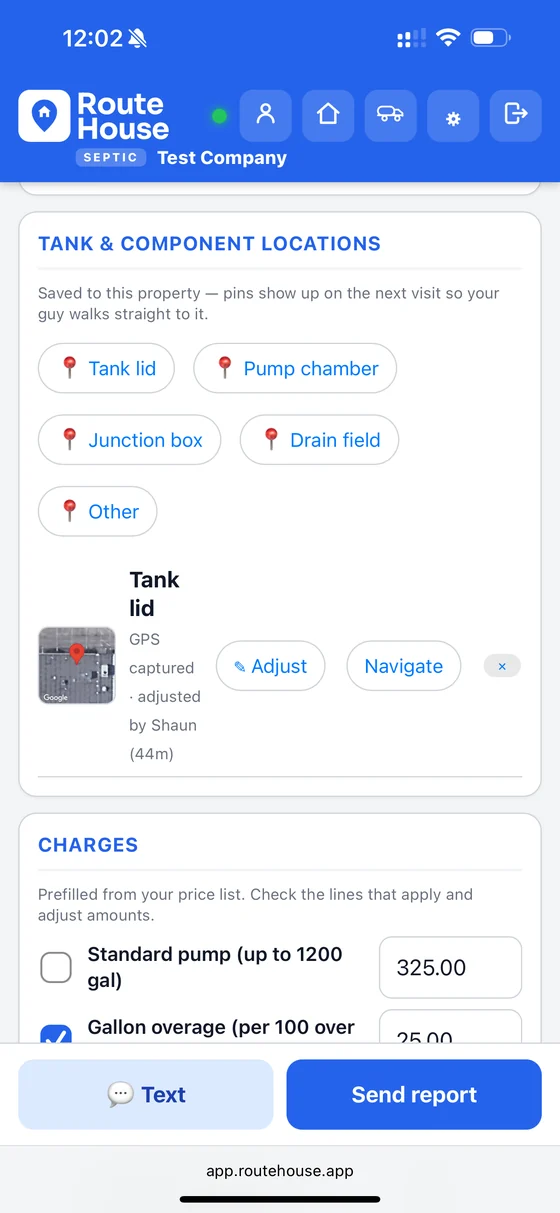
RouteHouse tank and component locations screen with GPS pins for tank lid, pump chamber, junction box and drain field

Pin the tank, find it next time

Drop GPS pins on the lid, pump chamber, junction box and drain field. They're saved to the property, so the next visit starts at the lid instead of a probe and a guess.

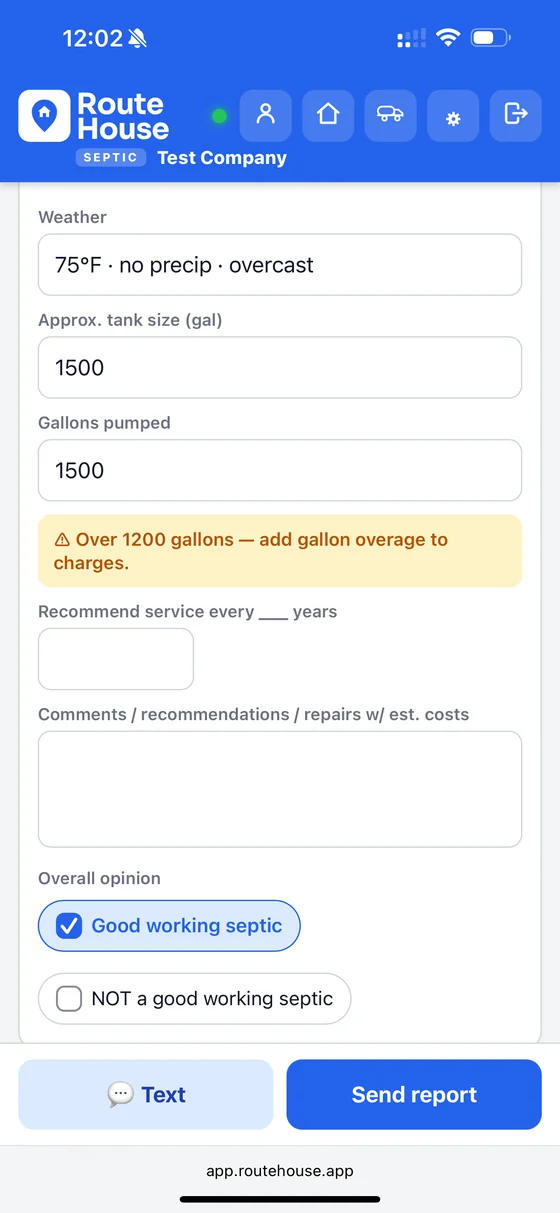
RouteHouse pumping report showing weather, tank size, gallons pumped, an over-1200-gallon overage warning and the overall opinion

The report thinks with you

Weather and tank details fill themselves in. You set each truck's tank size and the buffer you want left in reserve, and your own included gallons — pump past 1,200 and the app flags the overage before the tech forgets to bill it.

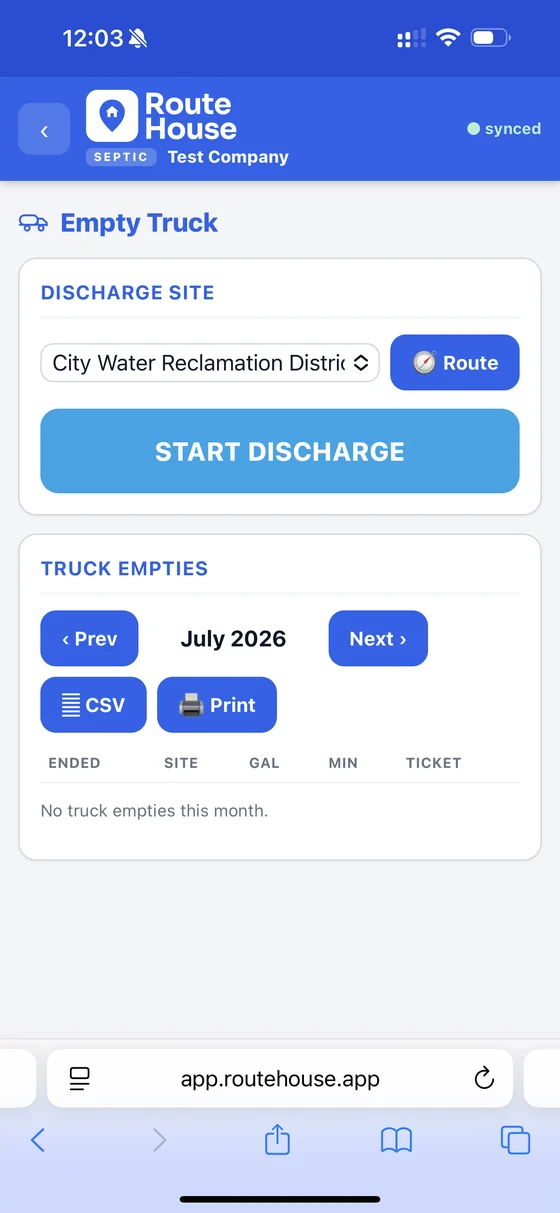
RouteHouse Empty Truck screen showing discharge site selection, start discharge, and a monthly truck-empties log with CSV and print export

Log every truck empty

Pick the discharge site, start the dump, and every empty lands in a monthly log you can export to CSV or print — the paper trail, kept for you.

Watch it work

Two minutes beats two pages of copy

Unedited screen recordings of the live app — the schedule your crew works from, and the office side you run the business on.

A day on the schedule

Septic, grease trap and drain jobs from the morning route through the “on my way” text — weather, crew, addresses and job notes all in one screen.

1 min 43 sec

The office side

Customers, properties, commissions and CSV exports — the admin work that usually lives in someone’s spreadsheet, running off the same records as the field app.

2 min 31 sec

Want it walked through on your own jobs? Book a demo →

Official state forms

Maryland OSDS property-transfer inspections, done digitally

The real-estate inspection is the septic job that still runs on paper. Fill the whole Maryland MDE OSDS inspection on the tablet in the field, and hand the buyer a finished report before you leave the driveway.

The whole inspection, in the field

All 19 sections on the tablet — property details and the owner interview, the document search, the component-by-component inspection, hydraulic, dye and pump-out testing, and the Satisfactory / Unsatisfactory / Satisfactory-with-Concerns summary with the signed inspector attestation.Booked as a Property-Transfer Inspection job, right on your septic schedule.

A finished report, on site

RouteHouse builds a complete Maryland OSDS Property-Transfer Inspection report as a clean vector PDF, filled from your inspection — ready to hand to the buyer, the agent or the approving authority.Nothing retyped — the report is built from what the inspector already entered at the property.

Turn it on when you need it Pro

Available on Pro, on the Septic edition, with your home state set to Maryland. It stays off until you want it — the owner switches it on under Septic → Official State Forms.Maryland today — the form-pack system is built to take more states and trades.

RouteHouse generates a complete OSDS report from your inspection data. It is not a reproduction of MDE’s published template — MDE releases that as a flat, non-fillable PDF. Maryland OSDS is the only official form pack live today.

Don’t see your state’s or trade’s form? Tell us and we’ll build it. Other official reports are available on request — send us the state, the trade and a link to the form.

Request a form →
Beyond the tank

Fill the schedule, and get paid faster

The field app runs the pumping job. This side grows the business — booking, billing, texting and the integrations pumpers ask for most. It's all live today.

📍 811 tickets, tracked. Offered on repair and install work orders. Digging on this job? Add the 811 ticket — legal start and expiry are tracked, the schedule warns before a ticket runs out, and you can paste the ticket email instead of typing it.

Time clock Growth & Pro

Crews clock in from the truck — their own phone or a shared tablet, even with no signal. GPS on every punch, overtime figured for you, and a payroll-ready export at the end of the week. See how it works →

Contract & after-hours rates

Give contract customers their own prices and minimums — their work orders use them automatically. Set your business hours and a multiplier, and after-hours hourly work gets the premium line on the invoice.

Customer sign-off on reports

The customer signs on the tablet; the signature prints on the report.

Emergency Call quick dispatch

Take the call, pick the truck that can do it and is on the clock, and send it — in under a minute.

Job costing Growth & Pro

See labor, materials and disposal against what you billed, and clocked hours that never made the invoice. Labor comes from the Time Clock.

Weather-aware scheduling Pro

Never send a crew into a washout. A 7-day forecast sits on your schedule and flags the days that put weather-sensitive work at risk — and each tech sees that risk on his own jobs.For septic that means dig-ups and drainfield work you don't want to start in the rain, called out before the truck rolls.

Calendar sync Pro

Your whole schedule in Google, Apple or Outlook — plus a private per-tech link so each person sees only his own route, nobody else's.

Website lead capture Pro

Turn your site into a booking engine. Use a hosted request page or embed it on your own site — requests land right in your schedule and convert to a job or quote in one tap, with address autocomplete and an optional auto-text confirmation.

Business texting

Text from your own registered business number — reminders and a two-way message center with replies and a chime, plus automatic STOP opt-outs handled for you.

Online card payments

Connect your own Stripe account — customers pay by card and the money goes straight to your bank. Send a secure "Pay this invoice" link by email or text. Paid and owing reconcile themselves, with an optional cash discount if you'd rather steer customers off cards.

Quotes & estimates

Branded, line-item estimates sent by email or text. Track what's been sent, and turn a won quote into a scheduled job in one tap — no re-typing.

QuickBooks Online

Push invoices straight to QuickBooks — no CSV in the middle. Run it by hand or set it automatic on a daily or weekly schedule, with tax-mismatch review flags before anything posts.

Recurring-service forecast

The service-due pipeline puts a dollar figure on your repeat work — this month out to five years — so you can see the revenue coming and rebook a customer in one tap.For septic that means your three-year pumping cycle, forecast as money on the calendar.

Follow-up leads

Any report that flags a problem becomes a bookable repair lead — nothing that needs a return visit slips through the cracks, and the work is already scoped.For septic that means a failing pump or a bad baffle noted at the tank turns into a repair on the books.

Works anywhere you operate

Available worldwide with localized currency and formats in ~140 countries, a field app in 9 languages, and holiday-aware scheduling across 7 countries.

Your logo on every report and quote. Route planning with satellite pins for tank and lid locations.
Field app now in 9 languages, and built for more.
New add-on · Now in pilot

Never miss a call

The first pumper who answers gets the backup call. The RouteHouse Phone Assistant answers every call, just the ones you miss, or only after hours — your choice — and drops a ready-to-schedule request in your Requests box. Backups are flagged 🚨 and can ring straight through to you.

Keep your number. Per-company add-on, works with any plan.

Call and hear “Tammy” now · (779) 278-8911

Demo line — the call ends after about 20 seconds, just long enough for a short intro. Your normal call rates apply. “Tammy” is just our demo: name your assistant anything you like, with a male or female voice in a range of accents to match your business.

See how the Phone Assistant works →
  1. It answers. A friendly, named assistant picks up like your front desk.
  2. It asks the right questions. When was it last pumped, where's the lid, is it backing up?
  3. It lands on your schedule. Call summary and transcript in your Requests box — one tap turns it into a job or quote, for you to confirm.
Included · Proposals & memberships

Turn pump-outs into a plan

Sell a pumping plan with member pricing: when the pump-out comes due, the customer picks a day from a text or email link, and renewals charge on auto-pay. Quote replacements and repairs three ways.

Included with RouteHouse. Financing through the lenders you already work with.

See proposals & memberships →
  1. Good / better / best proposals. Signed on the customer’s phone, with deposits built in.
  2. Maintenance plans. Member prices, a ★ on the schedule, and auto-pay on your own Stripe account.
  3. Visits that book themselves. Members pick a day from a text or email link; the rest land on your Call List.
Pricing

Priced by the truck. Unlimited users.

Add every tech and office helper at no extra cost — you pay for trucks, not seats. Early customers lock these rates in.

Do other work too? Any Trade jobs are included at no extra cost — grading, excavation and hauling, quoted, scheduled and invoiced in the same app, on the same trucks.

1 more trade free — grease trap service or your pick Each trade after that 40% off Unlimited users
Solo
One truck, owner-operator.
$99/truck/mo
$49.50/truck/mo
$1,188 covers 24 months
$1.63 a truck per day
+ 1 more trade free — your pickGrease trap service (or swap for any trade) · $99/truck/mo 100% off
  • Field app + admin console
  • Offline, photos, emailed reports
  • Property registry & invoicing
  • QuickBooks connect & CSV export
Growth
A small fleet of trucks.
$149/truck/mo
$74.50/truck/mo
$1,788 covers 24 months
$2.45 a truck per day
+ 1 more trade free — your pickGrease trap service (or swap for any trade) · $149/truck/mo 100% off
  • Everything in Solo
  • Multiple trucks & crews
  • Septic service work (time & materials) — repair, service & installation
  • Service-due reminders
  • QuickBooks auto-sync — push customers & invoices, import inventory items
  • Time clock with GPS + payroll export
  • Job costing — billed vs. actual

Prices are per truck, averaged over a 24-month term: buy one year (or 25% down, balance within 30 days) and your second year is on us. Year 2 free applies to paid trucks and plans; a free first truck (Solo with RouteHouse Payments) isn’t counted. One more trade free, your pick; each trade after that is 40% off. Limited-time offer — see payment terms. Unlimited users. Prices exclude applicable taxes.

Switching is on us.

Coming from Jobber, Tank Track, mHelpDesk, a spreadsheet or paper? On a Year 2 free plan we do the move for you.

  • Data import — customers, properties, equipment and service history
  • 1–4 live training sessions for office and crews
  • Switcher credit — a free month for every month left on your current contract

Just need scheduling, quotes and invoicing? Any Trade runs general service work for at least 10% less than Jobber, from $26 a month. It doesn’t include the tank registry, pumping reports, manifests or state forms — that’s what the Septic edition is for, and Any Trade jobs come with it. Compare Any Trade →

Questions

Septic pumping software, answered

  • What is septic pumping software? It replaces the paper pumping report with a tablet app. RouteHouse captures gallons pumped, the full inspection checklist, GPS tank and lid locations and photos, then emails a finished report to the customer and office before the truck leaves the site.
  • How much does RouteHouse cost for a septic business? It's priced by the truck, not per user — $99 to $249 per truck per month billed annually across the Solo, Growth and Pro plans, with unlimited office staff and crew on every plan.
  • Does RouteHouse work offline at the tank? Yes — the app works offline in the field and syncs the job, photos and GPS pins once the tablet is back in service.
  • Can I switch from Jobber or ServiceCore? Yes — switch and you get one free month of RouteHouse for every full month remaining on your current contract, up to twelve, and we'll move your data over for you at no cost.
  • Does it handle disposal manifests and trip tickets? Yes. Each job links its disposal — site, gallons, weight ticket, hauler permit and signature — into a manifest and trip ticket you can print, and every truck empty lands in a monthly discharge log you can export to CSV. On the Septic edition in Maryland, Pro also fills the full MDE OSDS property-transfer inspection and produces the report PDF.
  • Does RouteHouse do Maryland OSDS property-transfer inspections? Yes — on Pro, on the Septic edition, with your home state set to Maryland. Your inspector fills all 19 sections of the MDE OSDS inspection on the tablet and RouteHouse produces a complete Maryland OSDS Property-Transfer Inspection report as a PDF, filled from that inspection. Maryland is the only state pack live today; other official forms are available on request.
  • What device do I need to run it? Any tablet or phone with GPS and a camera — nothing you have to install from an app store. See the system requirements page for what to buy.

Go paper-free on your next route

Book a 20-minute demo and we'll run one of your real pumping jobs through RouteHouse — from the schedule to the emailed report.

Book a demo
See it on your jobs

Book a 20-minute demo

We'll walk one of your real routes through RouteHouse — schedule a job, run it on the tablet, and watch the report land in your inbox. Bring your paper form; we'll show you the digital version of it.

  • No slide deck — a live look at the actual app.
  • Founder pricing locked for early customers.
  • We help you set up your first day, free.

You'll pick a time on the next step. No spam, ever.