Jobber Alternatives for Route Trades | RouteHouse

Jobber alternatives for pumping, hauling and route trades

Jobber is the best-reviewed field service platform there is — 4.6 out of 5 across 1,475 Capterra reviews and 527 on G2. It is also built for quoting and one-off jobs, priced per seat, and it does not have an industry page for septic, grease traps, sewer work or portable restrooms. If your work happens at a tank or a rented unit rather than a service bench, that gap is the reason you're reading this.

Written by RouteHouse, who make one of the products on this list. Said up front rather than in the footer — and we've included where Jobber beats us outright.

The short version

Six alternatives, and what each one actually costs

Jobber publishes its pricing, which already puts it ahead of most of this category. The question isn't whether it's good software — it plainly is. The question is whether per-seat pricing and a general-purpose job model fit a business that runs routes.

SoftwarePublished priceWhat you pay forExtra usersBest suited to
RouteHouse$99 – $249 per truck / mobilled annuallyPer truckUnlimited, freeRoute trades: tanks, traps, wells, rented units
Jobber$49 – $499 / mobilled monthlyPer seat, tiered$29 / user / moQuote-and-invoice trades doing one-off jobs
Housecall Pro$79 – $329 / mo$59 – $299 billed annuallyPer seat bands$100 / mo (Essentials)$75 / mo (Max)Home-services shops wanting a big installed base
Service Fusion$245 / $382 / $627 / mo$208 / $325 / $533 annuallyFlat per companyUnlimited, freeLarger back offices that hate seat maths
FieldPulseNot publishedSeat-basedfull and limited field seatsNot disclosedOperators who want a guided sales process
ServiceCoreNot publishedNot disclosedNot disclosedPortable restroom operators wanting the incumbent
Service Autopilot$49 / $199 / $499 / moannual subscription rates, plus an unpublished sign-up feeBusiness + mobile licencesNot publishedLawn care with heavy route density

Every figure above comes from the vendor's own public pricing page, or from a named third-party listing where the vendor publishes nothing. Verified 26 August 2026. Sources: Jobber · Housecall Pro · Service Fusion · FieldPulse · ServiceCore · Service Autopilot

One caution on Jobber's annual column. When we checked, Jobber was running a “save up to 40%” promotion ending 31 August 2026, so its advertised annual rates were discounted. We've used its standing monthly list prices above rather than quote a promotional figure that expires. Check the current number on their page.

The seat problem

What happens when you hire

Here's the same business — three trucks — as the team around those trucks grows. Truck count is held constant so you can see what headcount alone does to the bill. All figures are published monthly list rates.

Three trucks, and…Jobber (Grow)Housecall Pro (Max)Service Fusion (Pro)RouteHouse (Growth)
4 peopleowner, dispatcher, 2 drivers$299 / mo5-user tier$329 / mo8 included$627 / mo$447 / mo
10 peopleadd a bookkeeper, a CSR, 4 crew$399 / mo10-user tier$479 / mo8 + 2 × $75$627 / mounchanged$447 / mounchanged
16 peoplea second dispatcher and a full crew$528 / mo15-user tier + 1 × $29$929 / mo8 + 8 × $75$627 / mounchanged$447 / mounchanged

Monthly list rates, verified 26 August 2026. RouteHouse Growth is $149 per truck per month billed annually, so three trucks is $447. Sources: Jobber · Housecall Pro · Service Fusion. Figures compare published list prices only and exclude payment processing, add-ons and taxes.

Being straight about this one: Service Fusion also charges nothing per seat, and at three trucks its Starter plan at $245 a month is cheaper than we are. On headcount alone it's the closest pricing model to ours in the whole category. Where the two diverge is the trade — Service Fusion is general field service, and a G2 reviewer describes inventory tracking as “almost unusable” for a large real-time database, which matters if you're tracking rented units.

The gap that matters

Jobber does not have a page for your trade

Jobber's industries directory does not include septic services — getjobber.com/industries/septic-services/ returns a 404. Neither is portable restrooms, grease trap service, or sewer and drain. The one adjacent trade it does cover is well water services.

That's not an oversight on Jobber's part; it's a product decision, and a reasonable one. Their model is a job with a quote, a visit and an invoice. Route trades need a different shape:

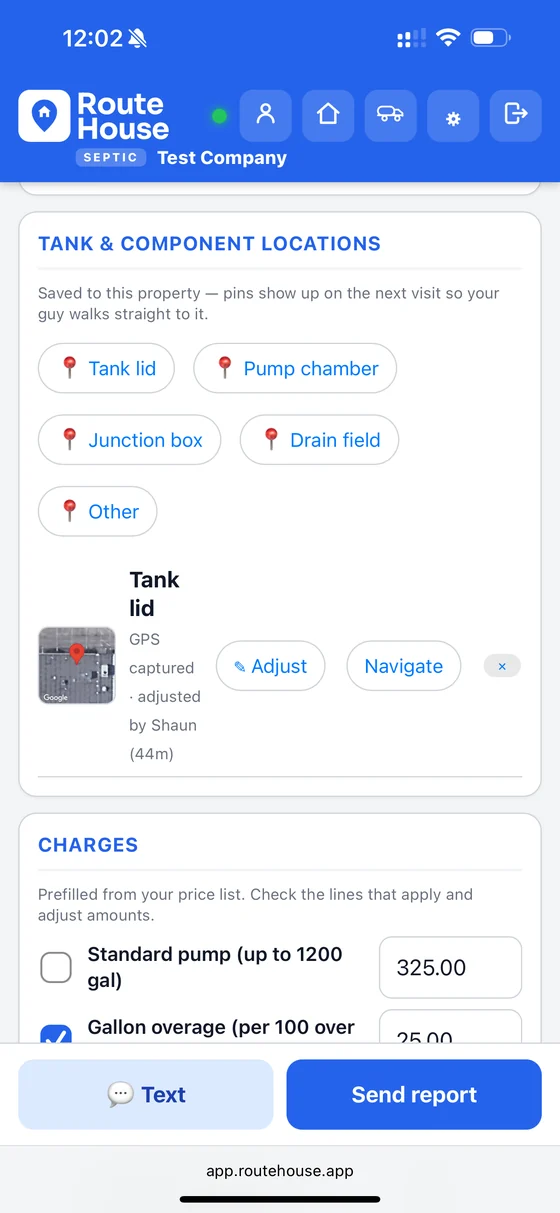
  • An asset that lives at the site. A tank, a trap, a well head, a rented unit — with its own history, its own GPS pin, and its own service interval. Not a line on an invoice.
  • A report that satisfies somebody else. Gallons pumped, a full pumping checklist, a manifest, a disposal record. Often a regulator's form, not yours.
  • A route, not a calendar. Sequenced stops with drive time between them, re-ordered when a hot job lands, and the same driver seeing the lid location he pinned last year.
  • Rental billing. Units on hire, delivered and picked up, billed on a cycle that has nothing to do with a completed job.

You can run a pumping business on general field service software. Plenty do. It usually means a spreadsheet on the side for the thing the software doesn't model — and that spreadsheet is what eventually makes people go looking.

Feature by feature

What a general platform can't do for a route trade

Only capabilities that ship today, and only gaps we confirmed on the vendor's own feature and industry pages. Three rows near the bottom are table stakes that everyone has, us included — they're here on purpose, so you can see which rows actually separate the products.

RouteHouseJobberHousecall ProServiceTitanService FusionFieldPulse
GPS pin on a fixed site asseta tank lid, trap or well head — navigate back to it next visitYessaved to the propertyNovehicle GPS + geofenced time onlyNovehicle GPS in ETA textsNoequipment records, no coordinatesNovehicle tracking onlyNoasset records, no coordinates
Which numbered unit is at which siterented restrooms, boxes, tanks on hireYesNot foundNot foundNot foundNot foundNot found
Rental billing on its own cycledecoupled from a completed jobYesNot foundNot foundNomemberships onlyNot foundNot found
Gallons pumped as reportable datanot free text on a generic formYesNocustom form fieldNocustom form fieldNocustom form fieldNojob checklistNocustom job template
An industry page for your tradeYesseptic, sewer, grease, wells, restrooms, lawn; roll-off in early accessNoseptic, restrooms, grease and sewer all return 404Yesseptic; no restroom, grease or roll-offYesseptic; no grease, restroom or rentalYessepticYesseptic
Waste manifests & trip ticketsgallons, disposal site, weight ticket, permit, signatureYesuniversal manifest today; state-specific forms comingNot foundNot foundNot foundNot foundNot found
Two-way customer textingtable stakes — everyone has itYesYesYesYesYesYes
Automated service-due reminderstable stakes — everyone has itYesYesYesYesYesYes
QuickBookstable stakes — everyone has itYesOnline today, one-way; Desktop and broader accounting comingYesOnline only, one-wayYesYesYesYes
Price published on the websiteYesYesYesNoYesNo

Verified 26 August 2026 against each vendor's own feature and industry pages. “Not found” means we checked and the capability is absent from their published material — not that it cannot be approximated with custom fields. Every general platform here has a form builder; the distinction we are drawing is between a form that holds a number and a field that feeds a report. Sources: Jobber · Housecall Pro · ServiceTitan · Service Fusion · FieldPulse

Where we are thinner today. Our QuickBooks push is one-way to QuickBooks Online; Desktop sync and broader accounting support are coming rather than shipped, and Housecall Pro, ServiceTitan, Service Fusion and FieldPulse already do Desktop. And our manifest is a universal form — it captures gallons, disposal site, weight ticket, permit and signature, but if your state mandates its own numbered form, those are in build. Both matter to some operators, and we would rather say so now than on week three.
Being fair about it

Where Jobber beats us outright

Jobber is genuinely excellent software and we're not going to pretend otherwise to sell you something.

  • Track record. 4.6 out of 5 from 1,475 Capterra reviews and 527 on G2, and over 400,000 service pros on their own numbers. We launched this year and have no review profile at all. If independent evidence is how you buy, they win and it isn't close.
  • Quoting and client communication. If your business is estimates, approvals and one-off jobs for homeowners, their quote-to-invoice flow is the best in the category.
  • You can try it free. Fourteen days on the Grow plan, no card. That's a real advantage over most of this list, including the vendors who won't even show you a price.
  • Breadth. Dozens of trades covered, a large integration ecosystem, and a support organisation sized to match. If you run several unrelated home-service lines, that breadth is worth paying for.

Where we'd argue we fit better

Your revenue comes off routes, not quotes. You're tracking equipment that stays at the customer's site. Somebody outside your company wants a report in a specific format. You're adding office staff and don't want the bill to follow them. And you'd like the price on the website.

If you're quoting landscape installs or one-off repairs, stay on Jobber. We'd tell you that on the call too.

From the reviews

The recurring complaints inside a 4.6

A 4.6 out of 5 is a very good score, and these quotes should be read against it. They're the themes that come up repeatedly in Jobber's own public reviews, verbatim.

“[T]o run a small business with 10 users it's about $10,000 a year. For a scheduling app it's excessive.”

Ian W., Director — Capterra

“The lack of reporting is disappointing… The data is obviously there, but there is no easy way to get to the many reports I would like to know.”

Garrett S., COO, Construction — Capterra

“The way the map function's, is very confusing… and make scheduling a real challenge!”

Billy L., Owner — Capterra

“[R]eporting feels more fragmented than it should be, and it takes extra time to pull together information…”

Kelly W., Business Operations Coordinator — Capterra

“Phone/tablet application is awful and very limited in scope”

Verified G2 reviewer — G2

“Don't like that all techs get all visibility”

Verified G2 reviewer — G2

Three themes repeat: getting data back out, the map and scheduling experience, and what ten seats costs by the end of the year. The first two are exactly the areas a route business leans on hardest.

The field

The alternatives, one at a time

RouteHouse

$99 / $149 / $249 per truck per month billed annually · unlimited users · seven trades

Route trades specifically: septic, sewer and drain, grease traps, wells and pumps, portable restrooms, lawn and landscape, with roll-off in early access. Digital service reports finished in the truck, GPS tank and lid mapping, route sequencing, automated customer texts, and a one-way push into QuickBooks Online. Multiple trades share one back office rather than running as separate systems.

Priced by the truck with unlimited office staff and crew, and the number is on the site. The honest weakness: we're new, with no review-site history. What you get instead is direct access to the people who build it.

Housecall Pro

$79 / $189 / $329 per month monthly, $59 / $149 / $299 annually · extra users $75 – $100 / mo · no long-term contract

The other giant, with 200,000+ professionals on its own numbers and 4.7 out of 5 from 2,743 Capterra reviews. Its strongest published claim is on contracts: “unlike some other field service management software, Housecall Pro does not require long-term contracts.” In a category full of annual lock-in, that's worth something.

The seat cost is the thing to model before you sign. $100 per additional user on Essentials is the steepest per-seat rate in this comparison, and reviewers say so plainly — one describes the desktop interface as “absolutely a mess on a computer,” and another flags aggressive sales follow-up.

Service Fusion

$245 / $382 / $627 per month, $208 / $325 / $533 annually · unlimited users on every plan · month-to-month

The closest thing to our pricing philosophy from a general-purpose vendor: flat per company, unlimited users, month-to-month, with onboarding and support included. If seat maths is what drove you off Jobber and you don't need trade-specific tooling, look here first — we'd rather you found the right fit than took our word for it.

The caveats come from its own reviewers: mobile app lag, and inventory tracking that a G2 reviewer describes as “almost unusable to keep any trackable large database of inventory in real time.” If you're tracking hundreds of rented units, test that hard before committing.

FieldPulse

Not published · seat-based · three packages

Well regarded — 4.6 out of 5 from 490 Capterra reviews — and it does have a dedicated page for septic companies covering pumping, repairs and installs. Worth a conversation if you want a guided implementation.

No published pricing. Its own page says pricing is seat-based across full-access and limited field seats with a custom quote, and Capterra shows no free trial. Reviewers flag field-app loading and QuickBooks sync as the sore spots.

ServiceCore

Not published · annual contract · six to twelve week implementation

The liquid-waste incumbent, strongest on portable restroom rental and asset tracking, with the largest verified review base in the niche at 4.0 out of 5 from 51 Capterra reviews. If porta-potties are your whole business, they belong on the shortlist.

Their pricing page shows two plan names and no figures, states that billing is monthly on an annual contract, and their site says implementation typically takes six to twelve weeks. Fuller breakdown here.

Service Autopilot

$49 / $199 / $499 per month on annual subscription rates · “+ sign up fee” on every tier, amount not published

Lawn-care native with serious route-density automation, and a real option if that's your trade. Two things to price before you commit: the sign-up fee printed on every tier is never quantified anywhere on the site, and reviewers report the payment processor is no longer your choice — one president writes that “the company was bought by a credit card processor so you no longer have a choice of processor - which means rate increases sneak in.”

Switching

The part everyone else makes hard

Operators rarely stay on software they've outgrown because they like it. They stay because switching looks like a month of evenings, and because there's a contract with months left on it. We took both of those off the table.

We do the migration

Send us an export — customers, sites, tanks and equipment, service history, your price book. We load it, we reconcile it against your records, and you sign off before anything goes live. Nobody on your team is re-typing a customer list at nine at night.

We credit your remaining months

Still inside an annual contract? We credit the months you have left on it — one free month of RouteHouse for every full month remaining, up to twelve. You don't pay two vendors to leave one.

Your first day gets set up with you

We build your first routes together, on a call, with your real jobs and your real terminology. Not a help-centre article and a login, and not a project plan measured in weeks.

Switching credit: one free month for each full month remaining on your current provider's agreement, to a maximum of twelve, and a combined maximum of fifteen free months when stacked with any other offer running at the time. A copy of your existing agreement is required. Full terms on the payment terms page.

Why RouteHouse

Same infrastructure. Different phone number.

Every platform on this page runs on the same handful of cloud providers we do. The billion-dollar vendors aren't running better servers — they're running the same ones, with more layers of people between you and whoever can actually change the software.

You reach the people who build it

RouteHouse is founder-led. When you ask for a field on a report or a change to how a route sorts, it goes to the people writing the code — not into a feedback portal to be counted. That isn't a claim about how big we are. It's a claim about how far your request has to travel.

The roadmap moves in weeks

Trade software is full of features that were promised for last spring. We ship continuously, we tell you what we're working on, and if we can't do something we say so instead of parking it. Customers on the phone with us have changed the product more than once.

Built to scale with the fleet

Priced by the truck with unlimited office staff and crew, so adding people never costs you anything, and adding trucks costs exactly what the page says. The operators we work best with are the ones with real fleets and more than one trade running out of one back office.

You can check on us without asking

Our system status is public at getroutehouse.com/status — the field app and sync, reports and photos, the database, email delivery and address lookup, each checked live and refreshed every 45 seconds, whether or not anything is wrong. We monitor the platform continuously and your data is backed up on a regular schedule.

Founder-led doesn't mean run out of a garage. It means the person who answers the phone is the person who gets paged.

Straight answers

Questions operators actually ask

  • How much does Jobber cost per user? Jobber's plans include a set number of users and additional users are $29 per month each. Published monthly list prices run from $49 for Core with one user to $499 for Plus with five users, with tiered pricing in between.
  • Does Jobber have software for septic or portable restroom businesses? No. Septic services, portable restrooms, grease trap service and sewer and drain are all absent from Jobber's industries directory; all four URLs return a 404. Well water services is the one adjacent trade Jobber does cover.
  • Is Jobber good software? Yes. It rates 4.6 out of 5 across 1,475 Capterra reviews and 527 G2 reviews, which is the strongest independent record in field service management. The question for a route business is fit rather than quality: Jobber is built around quotes and one-off jobs rather than routes, site-based assets and rental billing.
  • What is the cheapest alternative to Jobber? On published list price, Service Autopilot's Startup plan at $49 per month matches Jobber's Core plan, though Service Autopilot adds an unpublished sign-up fee. For teams rather than solo operators, the flat unlimited-user plans from Service Fusion and the per-truck pricing from RouteHouse usually cost less once headcount grows, because neither charges per seat.
  • What does RouteHouse cost? RouteHouse is priced by the truck, not per user: $99, $149 or $249 per truck per month billed annually, with unlimited office staff and crew on every plan. Prices exclude applicable taxes.
  • Can I move my Jobber data to RouteHouse? Yes. We handle the migration: you export customers, sites, equipment, service history and your price book, we load and reconcile it, and you sign off before go-live. If you are still inside a contract elsewhere we credit the months you have remaining, one free month for each, up to twelve.
See it on your jobs

See it on one of your routes

Twenty minutes, no deck. Bring a real route and the form your techs fill in today, and we'll run it through RouteHouse while you watch. If Jobber is the better fit for how you work, we'll say so on the call.

  • No slide deck — a live look at the actual app, on one of your real routes.
  • We do the migration. Your customers, sites, history and price book come across with you.
  • Still under contract? We credit the months you have left, up to 12.

You'll pick a time on the next step. No spam, ever.

All product names, logos and brands are property of their respective owners. All company, product and service names used on this page are for identification purposes only. Use of these names does not imply endorsement. RouteHouse is not affiliated with, endorsed by, or sponsored by any company named on this page. Every price, plan name and contract term attributed to another vendor was taken from that vendor's own public website or, where labelled, from a named third-party listing, and was verified on 26 August 2026. Vendors change their pricing without notice — follow the source links for the current figure.